

Users' Choice





Megapari Login Uganda (UG) — Safe Access & Troubleshooting
Contents
What This Page Is & What Isn’t?
✅️ This page is: a practical login guide: what the real login UI looks like, how password recovery works, how to handle common code/OTP failures, and what evidence makes support act faster.
❌ This page is not: a list of alternative links, an app install guide, or a bypass playbook.
Log Into MegaPari Uganda Here!Quick Start
The fastest login fix is route clarity + one clean retry + evidence, as the most lockouts happen because users keep retrying or request many codes.
So, do the following
- Confirm you’re on the correct login UI (next section)
- Use “one clean retry” discipline (request once → wait → retry once)
- If still stuck: send the Evidence Pack (template below)
How Does Megapari Login Work?
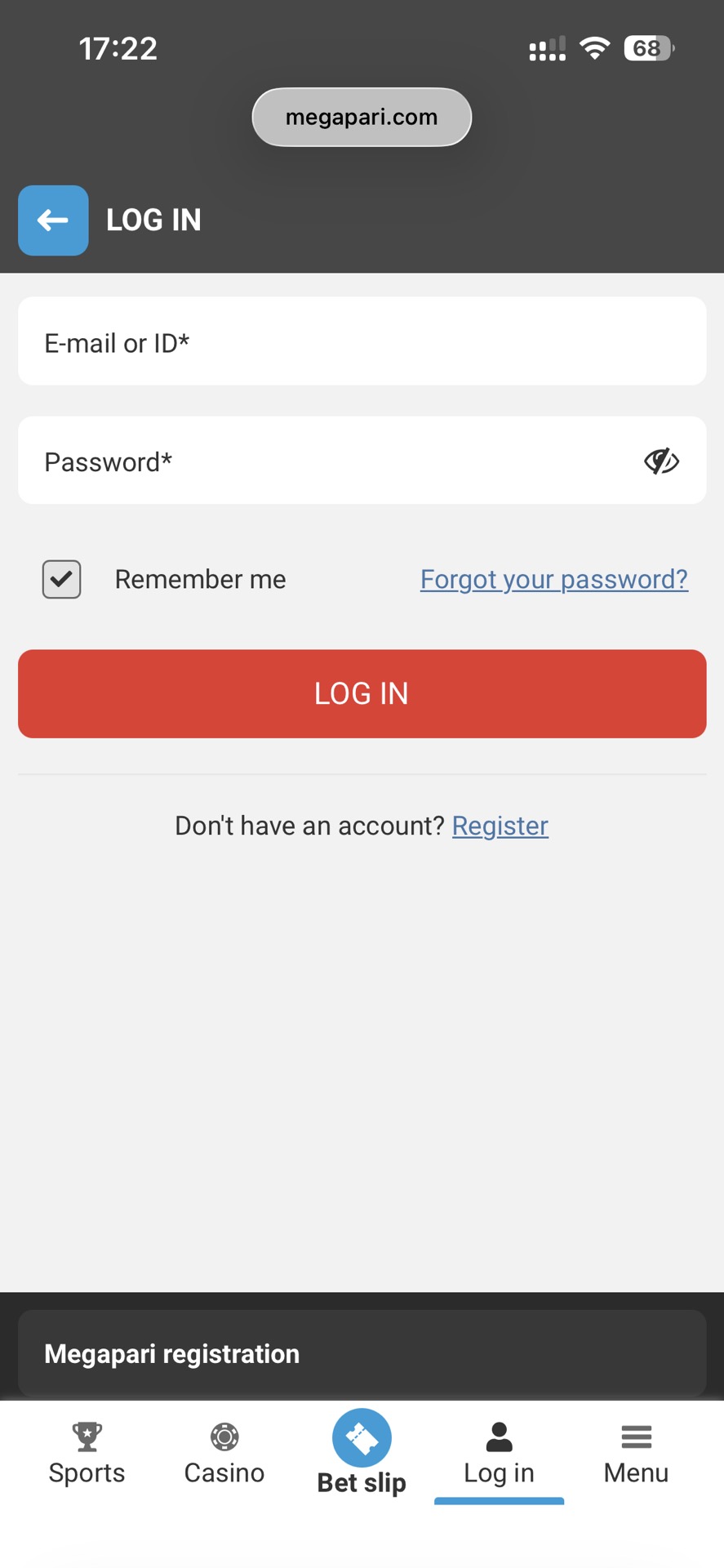
Megapari login uses two main credentials: your registered email (or user ID) and your password.
To log in:
- Open the official login page.
- Enter your E-mail or ID (the same email or user ID used during registration).
- Enter your password.
- Optionally select “Remember me” if you are on a private device.
- Click Log In.
If your password doesn’t work or you forgot it, use “Forgot your password?” to start the recovery process.
The login system checks the credentials and creates a session for your account. If multiple failed attempts occur, temporary security limits may appear.
The official login UI (facts)
On the official Megapari login page you should see:
- “E-mail or ID” field
- Password field
- Remember me checkbox
- Forgot your password? link
- Register option
Login facts
| UI element | What it means | What to do | Evidence to save |
| “E-mail or ID” | login identifier | use registered email or ID | screenshot if error |
| Password | credential | use password manager if possible | — |
| “Remember me” | keeps session | avoid on shared devices | — |
| “Forgot your password?” | recovery route | use only if you control the email | timestamp + screen |
| “Register” | new account | only if you intend to create new | screenshot route |
💡 Lifehack — Save ONE verified entry route (no link lists)
Re-Googling “login” increases wrong-route mistakes,as search results can include look-alikes. Beware! Once you’ve confirmed the UI above, bookmark it. Don’t chase “alternative links.”
Password Recovery – Forgot password
Megapari’s recovery page asks for the email used to register and includes a Send code step.
Password recovery map
| Step | What you should see | What to do | Evidence to save |
| Open recovery | email input + “Send code” | enter registration email | URL + timestamp screenshot |
| Receive code | code arrives via your email/channel | enter promptly | time received |
| Change password | new password entry | set unique strong password | confirmation screen |
Common Recovery Mistakes
- Using a different email than the one used to register
- Requesting multiple codes rapidly → mixing codes
- Switching devices and networks repeatedly mid-flow → harder to trace
Next action: request once → wait 2–5 minutes → retry once → stop and escalate with evidence.
Code / OTP problems (no bypass, only fixes)
We keep this generic: codes can be email/SMS/app-based. We don’t claim Megapari’s exact OTP mechanism unless you see it in your flow.
Invalid code loop
Invalid codes are often caused by time drift, delays, or rate limits, as the codes can be time-sensitive and multiple requests can throttle.
Example: “Invalid code” even when you typed quickly after multiple resends.
Action plan:
- Stop resending
- Wait 2–5 minutes
- Ensure device date/time is Automatic
- Retry once and screenshot the result
Code not Arriving
Delivery delays happen (email latency / network / carrier), because not every delay means the account is compromised.
Example: The code arrives late, but you requested a new one and now both are confusing.
Action plan: request once → wait → check spam/promotions → switch network once → capture evidence.
If you see X, do Y
- If you see “Too many attempts / try later” → stop attempts; prepare Evidence Pack; contact support
- If you see “Wrong email/ID” repeatedly → confirm you used “E-mail or ID” correctly (Table 1)
- If the login page is missing “E-mail or ID” / “Forgot password” UI → stop and re-verify route.
Account locked / too many attempts
Lock messages are security events, not “try again” events, as more retries can extend locks or trigger extra checks.
Example: You keep retrying and the lock persists.
Action plan: stop attempts, capture screenshots, escalate with a clean ticket.
Registration Router
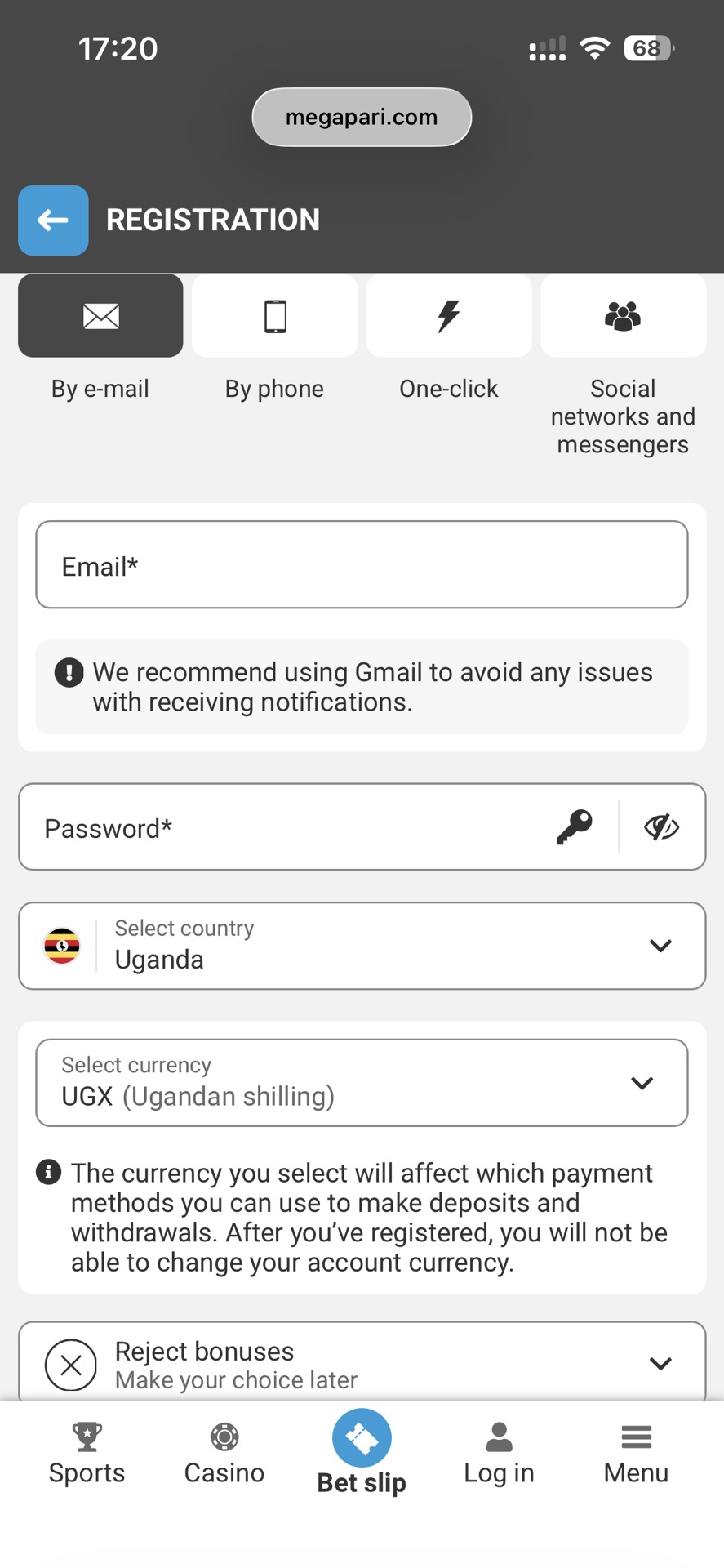
Megapari registration allows users to create an account using email, phone number, one-click setup, or social accounts.
To register by email:
- Select Country: Uganda
- Select Currency: Ugandan Shilling (UGX)
- Enter your Email
- Optionally add a Phone number
- Create a Password
- Enter a Promo code (optional)
- Click Register
Phone registration includes a verification step.
- Enter your phone number
- Click Send SMS
- Enter the confirmation code
- Select Currency (UGX)
- Optionally add:
- Email address
- Promo code
- Create a Password
- Click Register
One-click registration allows fast account creation:
- Select Country: Uganda
- Select Currency: Ugandan Shilling (UGX)
- Enter a Promo code (optional)
- Click Register
By clicking Register, you confirm you agree to the Terms and Conditions.
Users can also register using supported platforms such as:
- Telegram
- Twitch
- X
- Metamask
- Line
- Discord
In this flow, you still confirm:
- Country: Uganda
- Currency: Ugandan Shilling (UGX)
- Optional Promo code
Support Evidence Pack
Support can’t act on “login not working” without traceable evidence, as they need timestamps, URLs, and error text to find logs.
Use the table below!
Evidence pack
| Field | What to include |
| Route proof | full URL + timestamp screenshot |
| Account | masked email/ID (e.g., a***@mail.com) |
| Device | model + OS version |
| Network | Wi-Fi / mobile |
| Error | exact message + screenshot/screen recording |
| Actions tried | “requested code once / waited / retried once” |
Support ticket template (artifact)
| Field | What to include |
| Problem | exact error text |
| Time | timestamp + timezone |
| URL / Screen | full URL / screen name |
| Device | model + OS |
| Network | Wi-Fi / mobile |
| Proof | screenshots / screen recording |
Limitations: When this page won’t solve your case
- If access is restricted by account status/region, this page can’t override it; it helps you document and escalate.
- If you used an untrusted route and can’t prove the URL/timestamp, resolution becomes harder; return to verifiable flows.
- This is operational troubleshooting, not legal advice for Uganda.
FAQ
What should the real Megapari login page show?
“E-mail or ID”, password, Remember me, Forgot password, Register.
I requested a code multiple times—what should I do?
Stop requesting, wait 2–5 minutes, retry once, then escalate with evidence if it still fails.
(LG) Nyingira isn’t working—what do I send support?
URL + timestamp + error screenshot + device + network (Evidence Pack). (“yingira” used FAQ-only)
(LG) Okwewandiisa vs login—what do I do?
Use Register for new accounts; otherwise, use E-mail or ID + password. (“okwewandiisa” used FAQ-only)
See Also
👉 Megapari App Uganda Guide: https://ghanasoccernet.com/ug/app-reviews/megapari-uganda/
👉 Megapari Review Uganda: https://ghanasoccernet.com/ug/review/megapari-uganda/
Thanks for your help!
We appreciate your alertness!




You've successfully followed this author. You'll get notifications of his new tips on your registered e-mail.
You've successfully followed this expert. You'll get notifications of his new tips on your registered e-mail.
This means that you will no longer receive notifications about new posts by this author to your e-mail address.
You will no longer be notified of this expert's new tips.